
Request bodies
The body is the data a request sends: the JSON of a new record, the fields of a form, a file. Pick a body type on the Body tab and ApiWorkbench shows the right editor and sets the Content-Type header for you.
Choose a body type
Open the Body tab and select one of the chips. The tab label then shows the type, for example Body • JSON.
| Body type | Sends | Content-Type |
|---|---|---|
| None | Nothing | None |
| JSON | The text you type | application/json |
| Text | The text you type | text/plain |
| XML | The text you type | application/xml |
| Form URL-encoded | Name and value pairs | application/x-www-form-urlencoded |
| Form data | Text fields and file uploads | multipart/form-data |
| GraphQL | A query and its variables, as JSON | application/json |
| Binary file | One file, byte for byte | application/octet-stream |
Things that apply to every type:
- Methods. Any method except HEAD sends the body, GET included. HEAD never sends one. Switching the method does not clear the body, so set the type back to None when a request should send nothing.
- Content-Type. To send a different
Content-Type, add your own on the Headers tab. See Headers. - Variables.
{{variables}}and dynamic variables are filled in when you send, in typed bodies, in form field names and values, and in file paths.
None
The request has no body. This is the default and is typical for GET and DELETE. The tab reads This request has no body.
JSON
The most common body for APIs. Type the JSON exactly as it should be sent.
{
  "name": "Ada Lovelace",
  "email": "ada@example.com",
  "roles": ["admin"]
}
Beautify re-indents the JSON with line breaks and spacing. If the text is not valid JSON, it changes nothing and shows Body is not valid JSON. On a narrow window, Beautify is the wand icon at the end of the chip row.
ApiWorkbench does not check JSON before sending. It sends what you typed, which lets you test how a server handles broken JSON.
Variables work inside JSON. Put quotes around a variable that stands for a string:
{
  "id": "{{userId}}",
  "ref": "{{$guid}}",
  "quantity": {{quantity}}
}
More on the format: JSON basics.
Text
Plain text, sent as text/plain.
Hello serverXML
An XML document, sent as application/xml. Use it for SOAP services and older APIs.
<user>
  <name>Ada</name>
  <email>ada@example.com</email>
</user>
For a SOAP service that expects text/xml or a SOAPAction header, add those on the Headers tab.
Form URL-encoded
Name and value pairs, the way a plain web form sends them. Use it for classic login forms and for OAuth token endpoints.
Select Form URL-encoded.
Select Add field.
Type the name in Field and the value in Value.
| Field | Value |
|---|---|
email | ada@example.com |
remember | true |
The body that goes out is one line, with special characters encoded for you:
email=ada%40example.com&remember=trueUntick a row to keep it without sending it.
Form data
Text fields plus file uploads in one body, like a web page with a file picker. Each row is either Text or File.
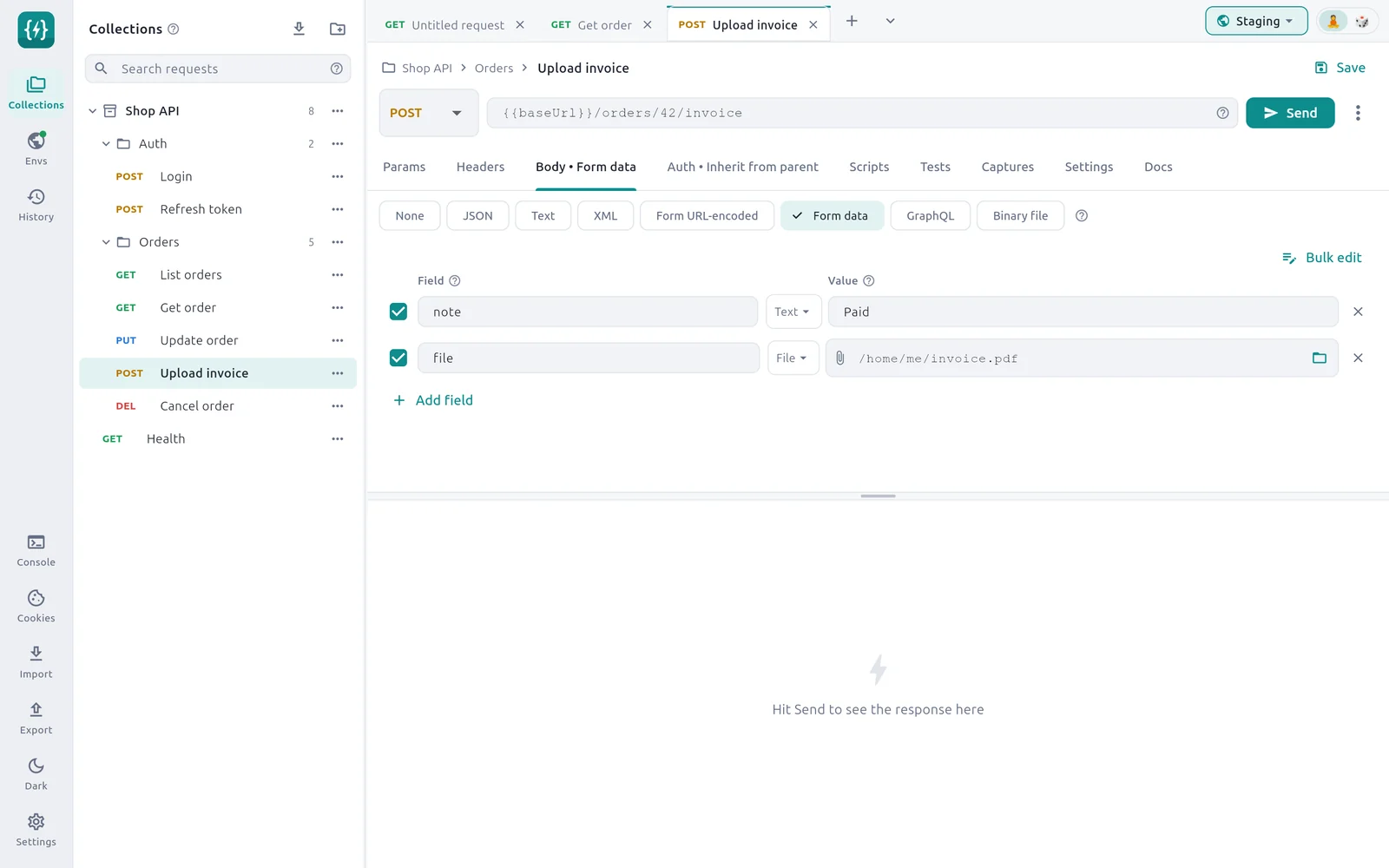
Select Form data.
Select Add field and type the field name the server expects.
For a text value, leave the row on Text and type the value.
For an upload, open the Text menu on the row and choose File. Then select the folder icon and pick the file, or type its full path.
- The multipart
Content-Type, with its boundary, is added for you. AContent-Typeheader you set yourself is replaced for this body type. - If a file path does not exist when you send, the request stops with
Form file not found:and the path. - A File row with an empty path is skipped.
- Form URL-encoded and Form data share their rows, so you can switch between the two types without retyping. File rows only make sense as Form data.
Files stay on your device
A file row stores the path, not the file. If you export the request and open it on another computer, pick the file again there.
Bulk edit for form fields
Bulk edit shows the fields as text, one per line. In Form data, write a file row with @ before the path.
note: Paid
// draft: yes
file: @/home/me/invoice.pdf
The full format is under Bulk edit. To send a text value that itself starts with @, write \@.
GraphQL
A query in the top box and its variables, as JSON, in the bottom box. Both are sent together as one JSON body. See GraphQL.
Binary file
One file sent as the whole body, such as an image, a PDF or a zip.
Select Binary file.
Select Choose file and pick the file, or type its full path in the field.
If the server needs to know the file type, add a
Content-Typeheader, for exampleimage/png. Without one the file is sent asapplication/octet-stream.
If the path does not exist when you send, the request stops with Body file not found: and the path. The path can contain variables.
Check what was sent
The Console shows the request as it went out, with the body and the final headers. Open it from the rail after sending. See Console.