
Set DPI stages
The Sensitivity tab sets how fast the pointer moves. You can keep up to five DPI stages, choose which one is active, and on some sensors set different speeds for horizontal and vertical movement.
DPI (dots per inch) is how far the pointer travels when you move the mouse one inch. A stage is one saved DPI value; a DPI button on the mouse steps through the stages.
Change a stage
Select the mouse under Devices and open the Sensitivity tab.
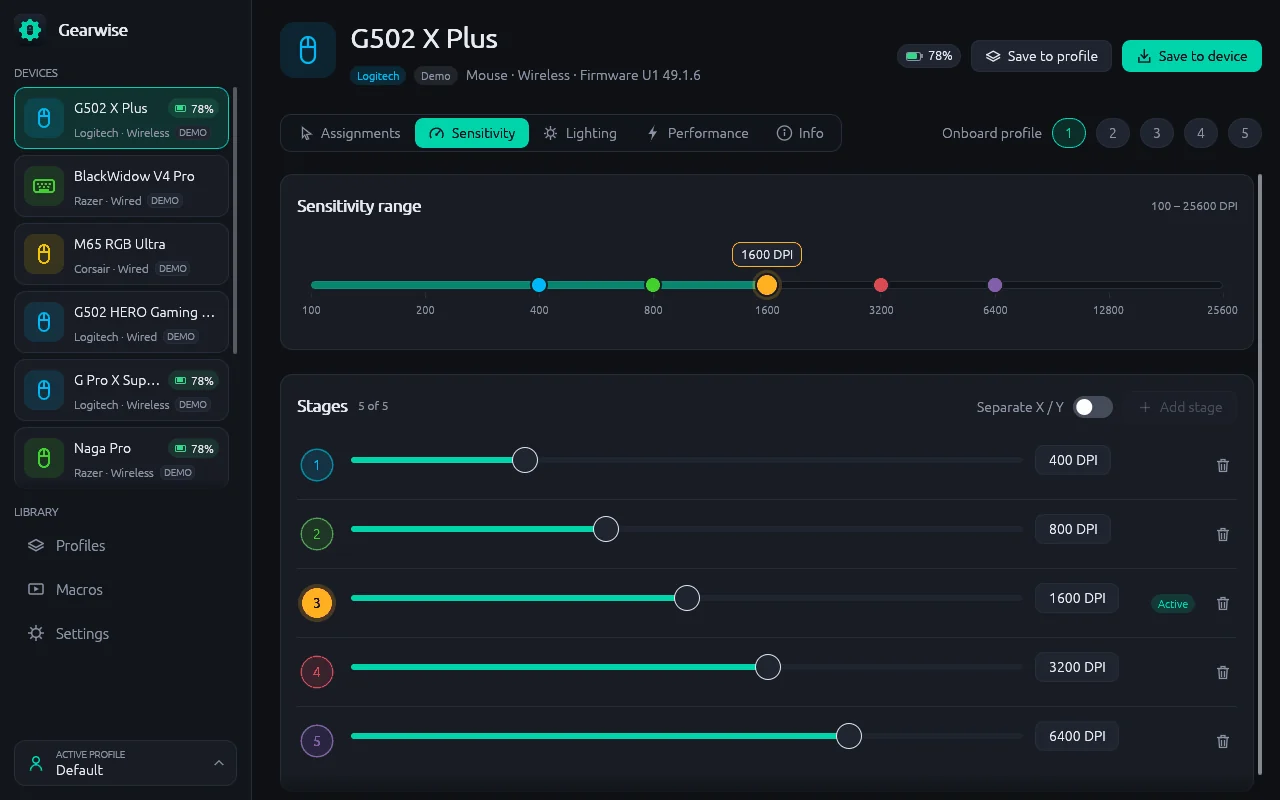
Under Stages, drag the slider of the stage you want to change, or select its value and type a number.
Gearwise snaps the value to the nearest step the sensor supports. The Sensitivity range bar at the top shows the lowest and highest DPI of the sensor, with a coloured dot for each stage.
Move the mouse to try the new speed.
Choose the active stage
Select the round stage number on the left of a row. Its tooltip reads Make this the active stage. The Active label moves to that row and the device switches to that DPI.
Add or remove stages
- Add stage adds a new row. The counter next to Stages shows how many you have and how many the device allows, for example 3 of 5. The button is greyed out when the limit is reached.
- The bin icon on the right of a row removes that stage. Its tooltip reads Remove stage.
Some mice have only one DPI setting and no stage table. They show a single stage.
Separate X and Y
If the sensor allows it, a Separate X / Y switch appears next to Add stage. Turn it on to give each stage one value for horizontal movement (X) and another for vertical movement (Y). Turn it off to use one value for both.
Report rate and other sensor settings
The Performance tab holds the settings that are not about speed. Each one appears only if the device supports it.
| Setting | What it does |
|---|---|
| Report rate | How often the device reports to the computer, in hertz (Hz). Higher is smoother and uses more processor time. Some Logitech and Razer mice go up to 8000 Hz. |
| Lift-off distance | How far the mouse can rise before the sensor stops tracking. |
| Angle snapping | Straightens small wobbles in diagonal movement. The app notes that it helps drawing and hurts aim. |
| Game mode | On keyboards: turns off the Super key and shortcuts such as Alt+Tab while you play. |
Use DPI from a button
You can also put DPI functions on a mouse button, such as DPI up, DPI cycle or a hold-to-slow-down DPI shift. See Remap buttons.
If the tab is missing
The Sensitivity tab only appears for devices that report DPI, so keyboards do not have it. If a mouse shows This device does not report DPI, Gearwise could not read its sensor settings.