
Circuit Lab
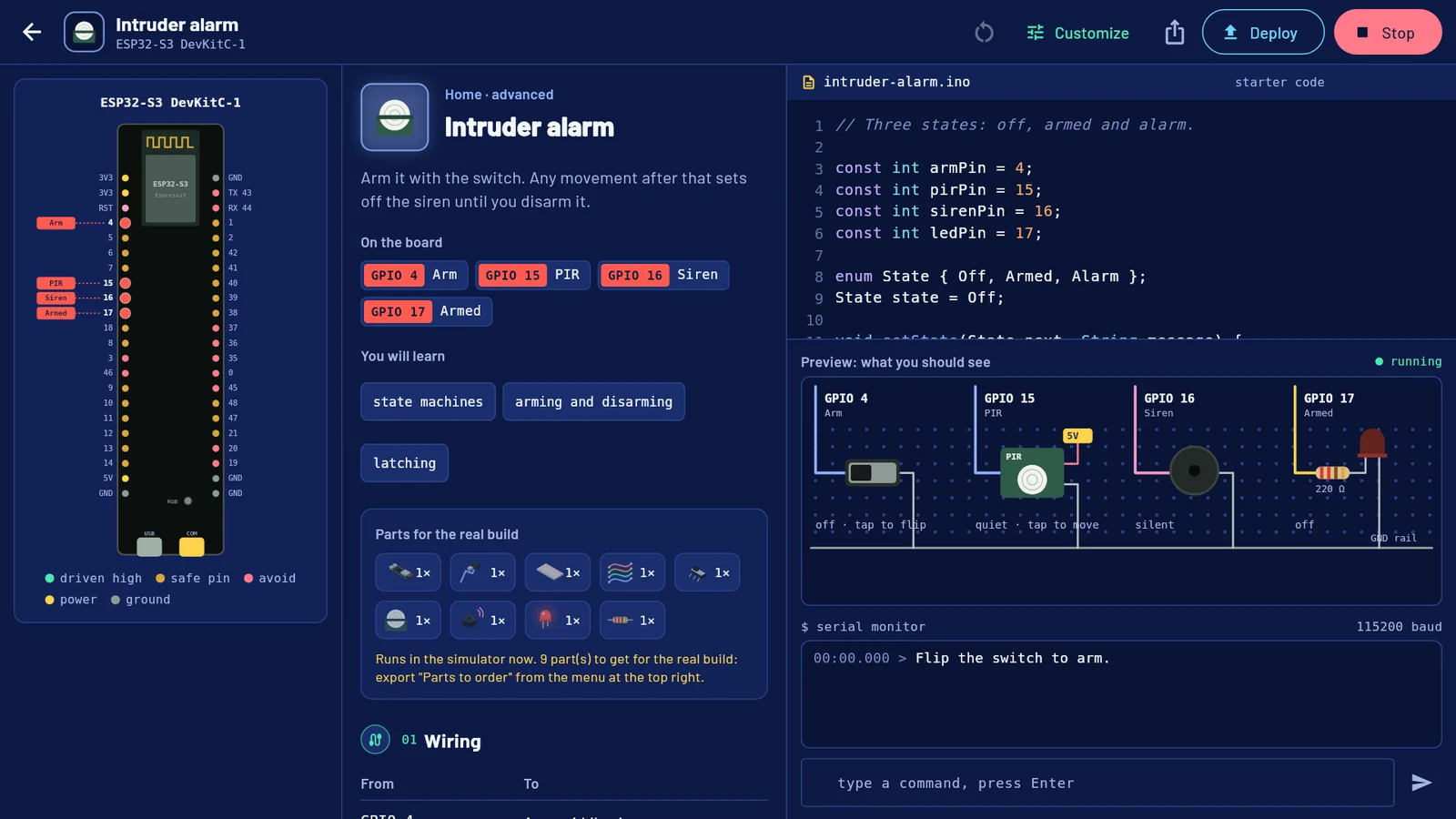
Circuit Lab teaches electronics on a simulated bench. Pick a board, open a project, and its Arduino sketch runs on screen: LEDs glow, servos turn, and you press the buttons and move the sensors yourself. When you want to build it for real, export the circuit diagram, a build sheet, the parts to order and the code.
What it does
- Guided labs. A short course for your board, from Hello, serial to a traffic light. Each lab has a wiring table, steps to tick off and a challenge.
- A project library. 88 ready-made projects in ten groups: Basics, Lights, Input, Sound, Sensors, Home, Garden, Motion, Games and Control. Each one is wired onto the board you pick, using pins that suit that board.
- A simulated bench. The sketch runs inside the app. A breadboard preview shows what the parts do, and lets you press buttons, flip switches and set what each sensor reads. A serial monitor shows what the sketch prints and sends it the lines you type.
- A circuit designer. Start a blank project, or make your own copy of any project with Customize. Add any of 21 kinds of part, assign pins, get warnings about risky pins and clashes, move the design to another board, and generate a starter sketch.
- Exports. The program (
.ino, or.pyfor a Raspberry Pi), a circuit diagram (.svg), a build sheet (.md), the parts to order (.csv) and a project file (.json) that Import reads back. - A datasheet for every board, in plain words: a pin map you can tap, a 3D model you can turn, and the rules that keep the board safe.
- A parts list. Tick the parts you own, see which labs you can build now, and download what is left to buy, with rough prices and buying tips.
- Deploy (Linux and Windows apps): compile the sketch with Arduino's own tool and upload it to a board plugged in over USB. Read the limits below first.
Who it is for
- Beginners who want to learn electronics and Arduino code before buying any parts.
- Students and teachers who want the same lab on different boards.
- Makers who want to try a circuit and its code first, then get a wiring sheet and a shopping list for the real build.
Boards
| Board | In the simulator |
|---|---|
| Arduino Uno R3, Arduino Nano, Arduino Mega 2560 | Yes |
| ESP32-S3 DevKitC-1 (the default) | Yes |
| ESP32 DevKit V1 | Yes |
| NodeMCU (ESP8266) | Yes |
| Raspberry Pi Pico | Yes |
| Raspberry Pi 4 / 5 | No: design and export only, with a Python starter script |
What the simulator is and is not
It interprets a subset of Arduino C++: variables, arrays, functions, if, for, while, switch, enums, String, Serial, digital pins, PWM, analog inputs, tone, pulseIn, Servo, millis and delay. It points out mistakes a real board would make silently, such as a missing pinMode, a floating input or an array index out of range.
It does not emulate the chips. Structs, classes, pointers, Wi-Fi, Bluetooth, I2C and SPI devices and other libraries are not supported. The buzzer is shown, not played. A Raspberry Pi 4 or 5 runs Linux and Python, and is not simulated at all. See the Reference for the full list.
Known limits in 1.0.0
- The library projects are written for the standard Arduino API but have only been run in this simulator, not compiled for each real board. A sketch that runs here can still need a fix when the real compiler sees it.
- Deploy has been tested against a stand-in for arduino-cli, not yet against a real board.
- The Windows build was made by the project's build workflow and has not been run on a Windows machine yet.
- Uploading to a board from inside the snap has not been tried.
Platforms
Circuit Lab 1.0.0 was released in November 2026. It runs:
- In a web browser, at circuitlab.dhivalabs.com, with nothing to install.
- On Linux, 64-bit, as a
.tar.gzor a snap. - On Windows 10 and 11, 64-bit, from a
.zip.
No Android or iOS build has been released yet. See Install.
Circuit Lab is free and open source under the MIT licence. It has no account, no ads and no tracking, and your projects and progress stay on your device. The source code is on GitHub at github.com/dhivadhiva/circuit_lab.