
Browse your results
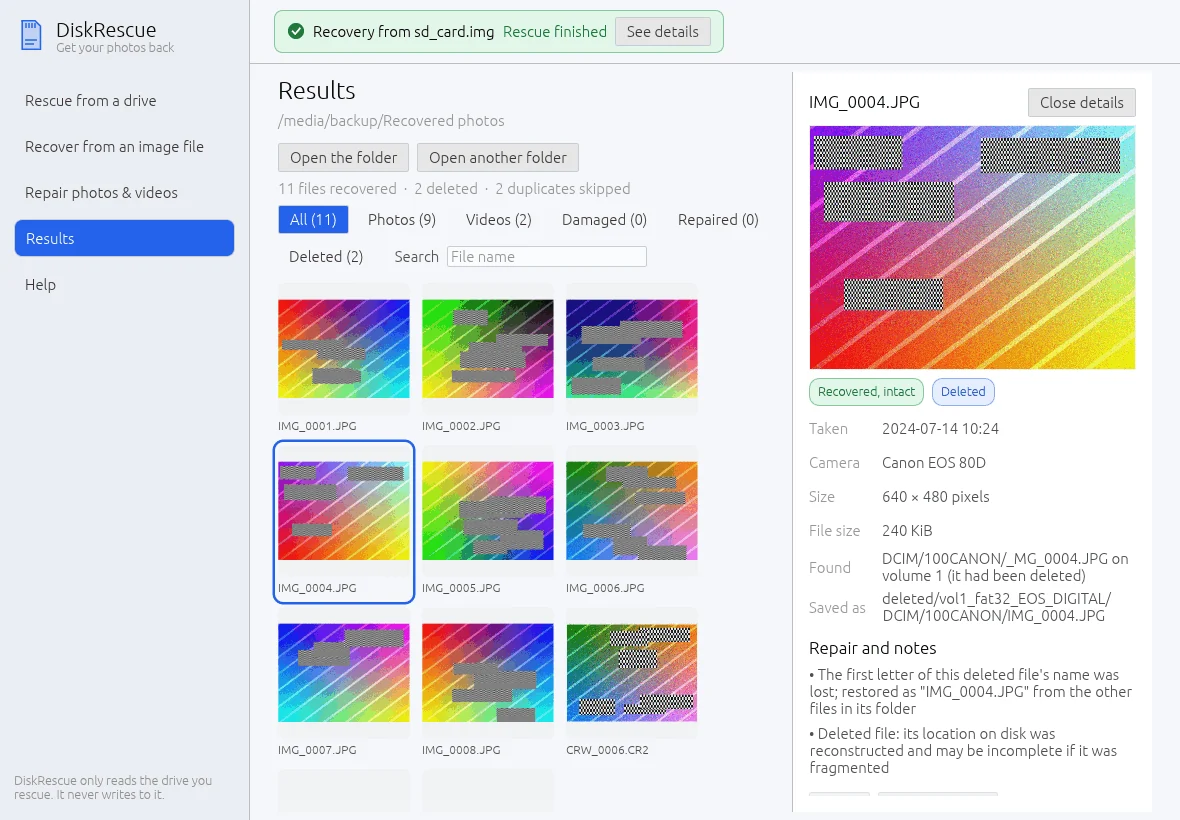
The Results page shows what a rescue brought back, as thumbnails, with the status of every file.
Open results
After a rescue, select See your recovered files. Later, open Results and pick one of the Recent rescues, or select Open another folder and choose the folder you saved a rescue to.
Filter and search
Use the filters All, Photos, Videos, Damaged, Repaired and Deleted, and the Search box for a file name. The line above the filters counts the files recovered, the deleted ones among them and the duplicates skipped.
What the status tags mean
| Tag | Meaning |
|---|---|
| Recovered, intact | The file passed its checks |
| Deleted | The file had been deleted and was found again |
| Damaged | The file does not pass its checks |
| Repaired | A repaired copy opens normally |
| Partly repaired | A repaired copy opens, but part of it is missing |
| Has unreadable parts | Some of its data could not be read from the drive |
The details panel also shows when a photo was taken, the camera, the size, where it was found and where it is saved. Repair and notes lists what DiskRescue did, for example a restored first letter of a deleted file's name.
A deleted file whose position on the disk had to be reconstructed may be incomplete if it was stored in fragments.
Repair a damaged file from the results
Select a damaged file and choose Repair with a reference file.... Pick a healthy photo or video from the same camera or phone. DiskRescue suggests healthy files of the same kind from the same results, best matches first.
Where the files are
The results folder contains:
files/      existing files, with their original folders
deleted/    deleted files found through the file list
carved/     files found by searching the raw data (their names were lost)
repaired/   repaired copies; damaged originals are kept
report.txt  every file that needs attention
report.json the same, for programs
Look in deleted/ first after an accidental delete, then in carved/.