
DiskRescue
DiskRescue gets photos and videos back from hard disks, SSDs, USB drives and SD cards that are failing, were reformatted or had files deleted. It also repairs damaged JPEG, PNG, MP4/MOV and AVI files.
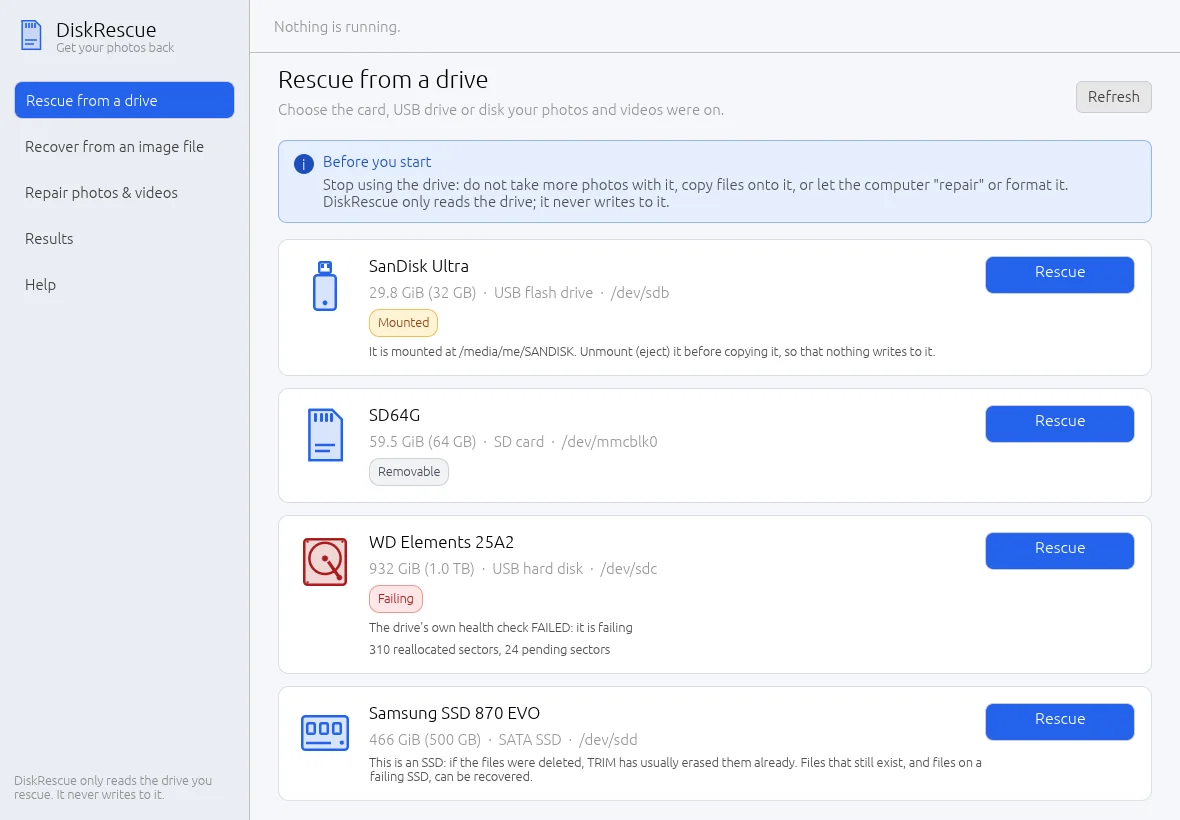
- 1Pages — Rescue from a drive, Recover from an image file, Repair photos & videos, Results and Help.
- 2Status — Shows the running rescue and its progress on every page.
- 3Before you start — The first rule: stop using the drive.
- 4Drive — Name, size, kind and device path of each drive found.
- 5Warnings — Tags such as Mounted, Removable or Failing, with advice below.
- 6Rescue — Starts the three-step rescue for that drive.
- 7Refresh — Reads the list of drives again.
What it does
- Copies a failing drive carefully. It reads the healthy areas first and comes back for the damaged ones. The copy can be stopped and continued at any time.
- Recovers files by name. Existing and deleted files, with folders and dates, from FAT12/16/32, exFAT, NTFS and ext2/3/4.
- Searches the raw data for photos, camera RAW files, videos and audio when the file list is damaged or gone.
- Checks and repairs what came back, and repairs damaged files you already have.
- Reports honestly. A report lists every file, where it came from, whether it is intact, and which parts could not be read. Unreadable parts are filled with zeros, never invented.
Three programs, one engine
| Program | For |
|---|---|
diskrescue-gui | The desktop app: pick the drive, press Rescue, browse your photos |
diskrescue-tui | The same flow inside a terminal |
diskrescue | The command line, for scripts and experts |
Built-in safety
- The drive you rescue is opened read-only. DiskRescue never writes to it.
- Saving onto the drive being rescued is refused.
- A drive that is in use (mounted) is refused unless you accept the risk.
- DiskRescue works offline. It never connects to the internet and sends nothing anywhere.
Read Before you start before you touch a drive with lost files. What you do in the first minutes matters more than any tool.
Honest limits
- DiskRescue has been tested extensively on synthetic disk images, simulated failing devices and generated media. It has not yet been proven on a wide range of real failing hardware.
- Deleted files on an SSD are usually erased by the drive itself (TRIM) within minutes. Recovering them rarely works.
- A drive that reports 0 bytes, clicks continuously or does not spin up is beyond software. A data recovery lab can often still help.
- Not supported: APFS, HFS+, btrfs, XFS, encrypted volumes, and files stored in scattered fragments when found by raw search.
Platforms
Linux and Windows. See Install.