
Disc Writer
Disc Writer is a disc-burning app for the Linux desktop. It burns files and folders to CD, DVD and Blu-ray, writes disc image files to disc, saves a project as an ISO file, and erases rewritable discs.
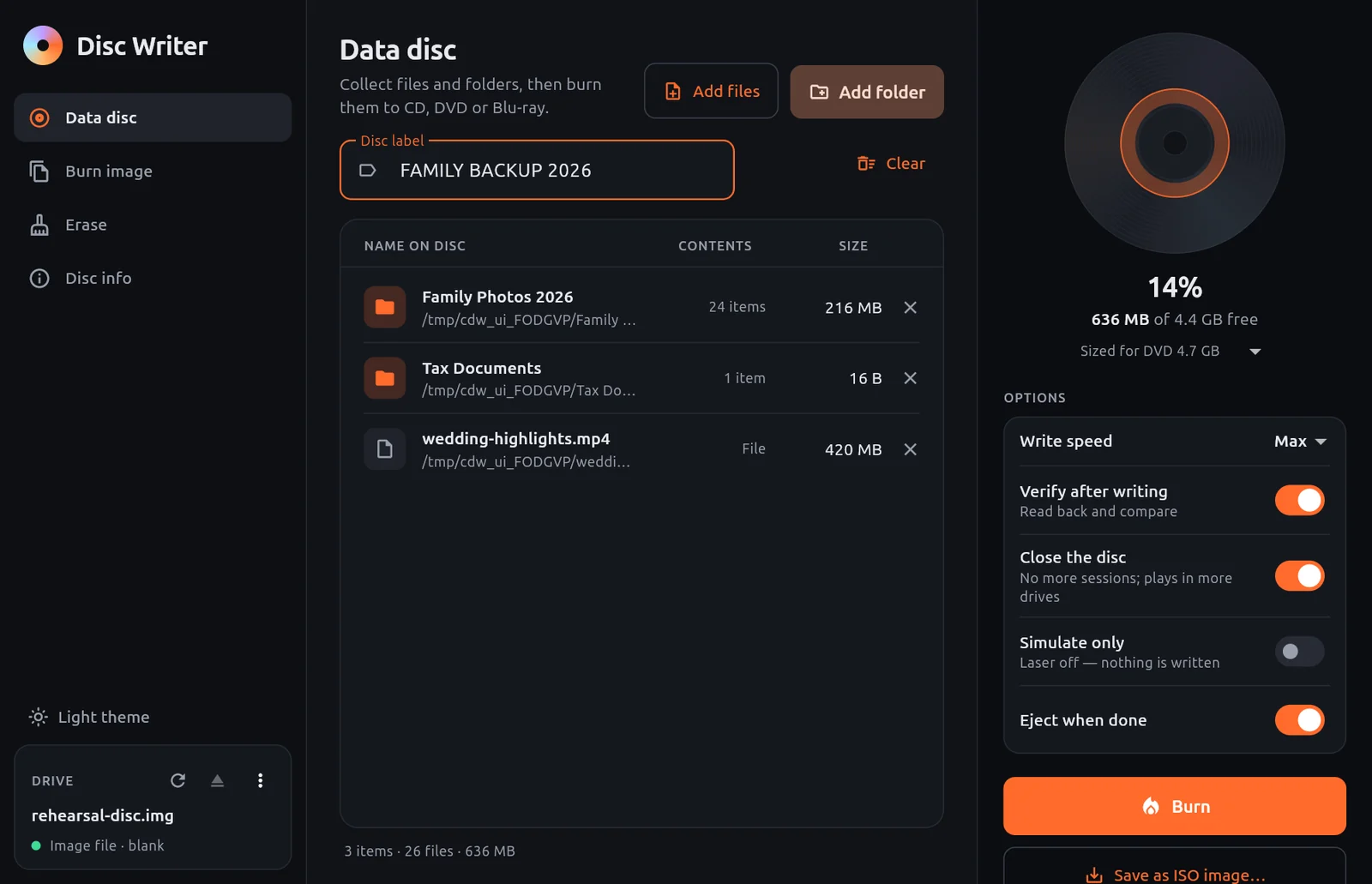
- 1Pages — Data disc, Burn image, Erase and Disc info.
- 2Add files — Add files or folders. You can also drop them onto the window.
- 3Disc label — The name the disc shows when it is inserted.
- 4Contents — What will be on the disc, with its size.
- 5Capacity — How full the disc will be.
- 6Options — Speed, verification, closing the disc, simulation and eject.
- 7Burn — Starts writing the disc.
- 8Drive — The drive in use and the disc inside it.
What it does
- Data discs. Collect files and folders, name the disc and burn. A capacity gauge shows how full the disc will be.
- Multi-session. While a disc is still open, new files are added next to the existing ones.
- Verification. After writing, the disc is read back and checked.
- Burn image. Writes
.isoand.imgfiles exactly as they are, so bootable installers stay bootable. - Save as ISO. Writes the project to an ISO file instead of a disc.
- Erase. Quick or full erase for CD-RW, DVD±RW, DVD-RAM and BD-RE.
- Simulate. Runs a burn or erase with the laser off, so nothing is written.
- Image file as a drive. Makes a file behave like a blank rewritable disc, for rehearsing without a drive.
Disc Writer does the burning with xorriso, a widely used burning tool.
Good to know
Disc Writer burns data discs and disc images. It does not create audio CDs for CD players.
Who it is for
Anyone who needs to put files on a disc, make a bootable installer disc, or reuse a rewritable disc on Linux.
Platforms
Linux with an optical drive, internal or USB.