
Interactive rebase
Tidy up a run of commits before you share them: change their order, fix a message, fold small fixes into the commit they belong to, or remove a commit.
What an interactive rebase is
A rebase replays commits one by one on top of a base commit. An interactive rebase lets you edit the list first. Git then builds new commits from your edited list and moves your branch to them.
The old commits are replaced by new ones with new hashes. That is why you rebase commits that are still only on your computer, and think twice about commits you already pushed.
BranchPilot runs the real git rebase -i for this. A paused rebase behaves the same as one started in a terminal.
Before you start
- Be on a branch. The option is unavailable with a detached
HEAD. - Commit or stash your uncommitted changes. Git does not start a rebase over uncommitted changes to tracked files.
Open the editor
In the commit graph, find the last commit you want to leave untouched. This is the base. Everything above it on your branch, up to where you are now, goes into the list.
Right-click that commit and choose Interactive rebase onto this commit….
The item is unavailable on the commit you are currently on, because there would be nothing to rebase.
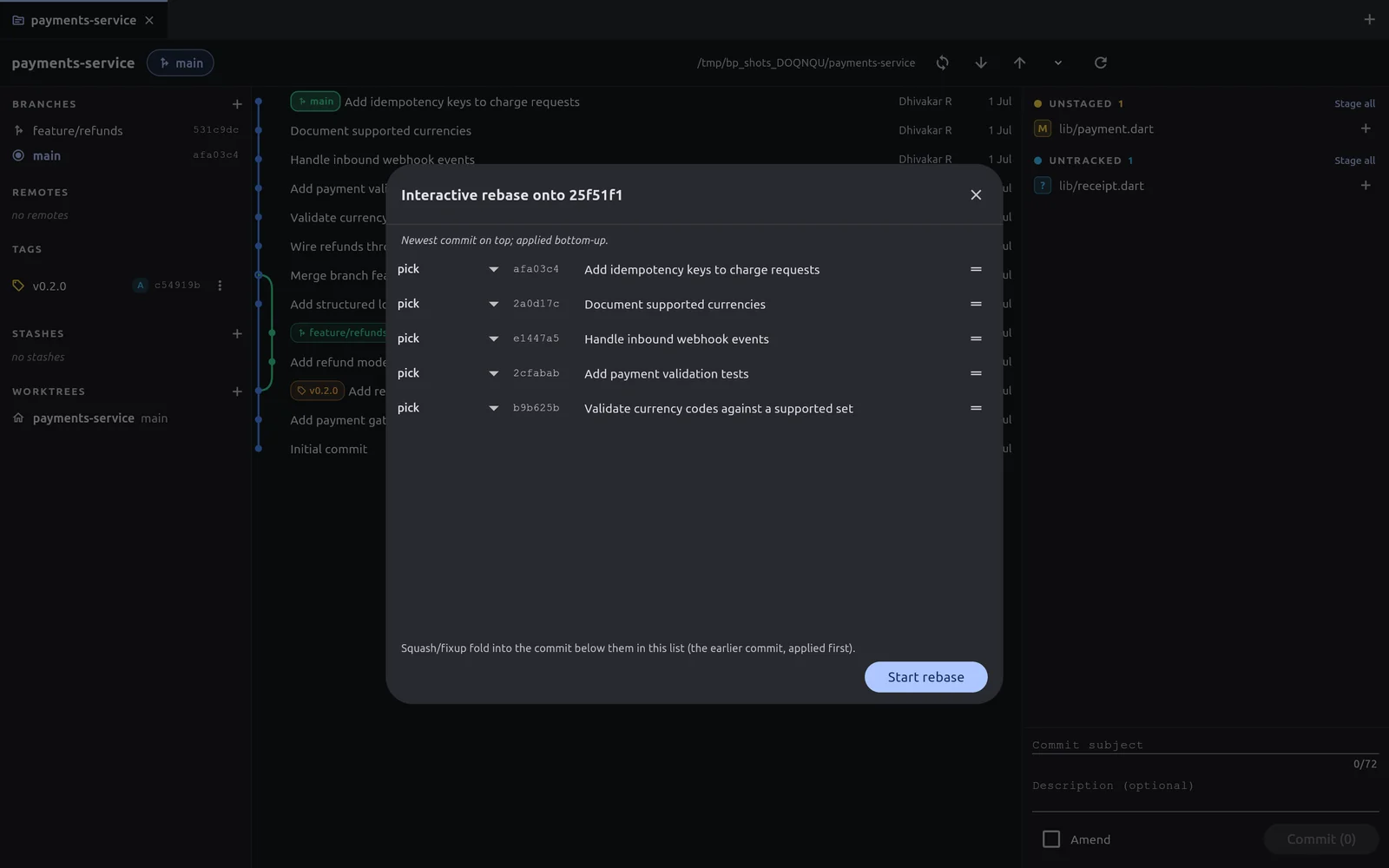
The dialog title names the base, for example Interactive rebase onto 25f51f1. The note at the top explains the order: Newest commit on top; applied bottom-up. Git starts with the bottom row and works upwards.
Edit the list
Reorder. Drag a row by the handle at its right end.
Choose an action. Each row has a menu at its left end:
| Action | What happens to the commit |
|---|---|
pick | Kept as it is. This is the default. |
reword | Kept, with a new message. A Reword dialog opens; type the message and select Save. |
squash | Folded into the commit below it in the list. The messages are combined. |
fixup | Folded into the commit below it in the list. This commit's message is discarded. |
drop | Removed. Its changes are not replayed. |
The note at the bottom repeats the rule for folding: squash and fixup fold into the commit below them in the list, which is the earlier commit and is applied first.
A reworded row shows the first line of its new message, so you can check it before you start.
The editor stops you from starting a list that cannot work:
- The first kept commit cannot be a squash/fixup: the bottom-most kept row has no earlier commit to fold into.
- Every commit is dropped: that would discard all of them. Use reset if that is what you want.
Run it
Select Start rebase.
- If everything applies cleanly, BranchPilot shows Rebase complete and the graph shows the new commits.
- If a commit conflicts, you see Rebase paused on a conflict — resolve in the right panel. A Rebase in progress banner appears with Abort, Skip commit and Continue. Follow Resolve conflicts.
Abort at any pause puts the branch back exactly as it was before the rebase.
For a list of more than 100 commits, the editor warns that the rebase may take a while.
WARNING
drop removes a commit's changes from the branch, and a rebase rewrites every commit in the list. If those commits were already pushed, the remote will refuse a normal push afterwards and you will need a force push. Do not rebase commits on a branch other people work from.
A worked example: fold a typo fix into its commit
You have three new commits, newest first:
pick  Fix typo in refund message
pick  Add refund tests
pick  Add refund model
The typo fix belongs to Add refund model.
Open the editor on the commit just below Add refund model in the graph.
Drag Fix typo in refund message down so it sits directly above Add refund model.
Set its action to
fixup.Select Start rebase.
The result is two commits: Add refund model, now including the typo fix, and Add refund tests.
If you reopen the repository mid-rebase
A paused rebase is stored in the repository. Open the repository again and the Rebase in progress banner returns, so you can resolve, continue, skip or abort.