
Browser extension
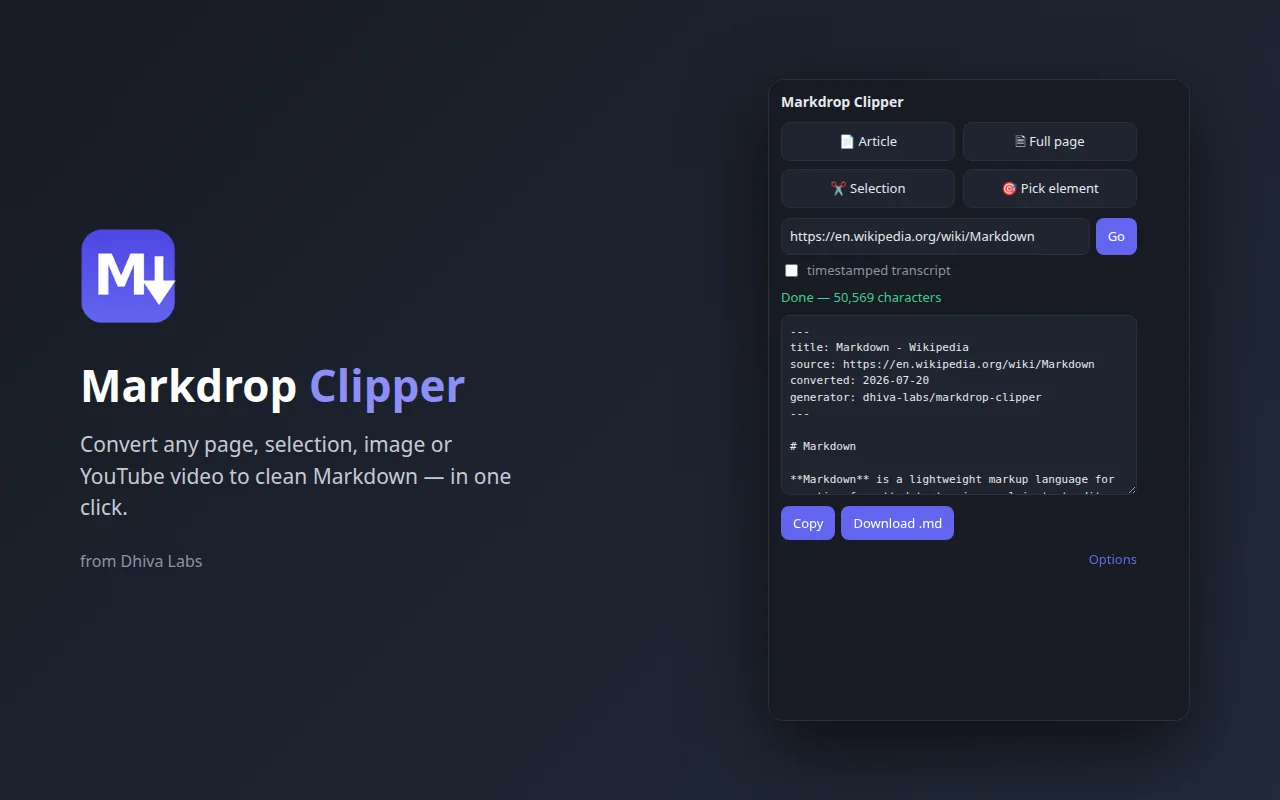
Markdrop Clipper converts what you see in your browser to Markdown: a whole article, part of a page, blocks you pick, an image, or a YouTube video's transcript. Pages are converted inside your browser.
Install the extension
The extension is in review on the Chrome Web Store and addons.mozilla.org. Until a listing is live, load it from the release files.
Chrome, Edge and Brave
Download
markdrop-clipper-chrome-0.1.1.zipfrom the latest release and unzip it into a folder you will keep.Open
chrome://extensions(in Edge,edge://extensions).Turn on Developer mode.
Select Load unpacked and choose the unzipped folder.
Firefox
Firefox 140 or later is needed.
Download
markdrop-clipper-firefox-0.1.1.zip.Open
about:debugging, then select This Firefox.Select Load Temporary Add-on and choose the zip file.
A temporary add-on is removed when Firefox closes. Load it again after a restart, or install it from addons.mozilla.org once it is listed.
Convert from the popup
Select the Markdrop Clipper icon in the toolbar, then one of the four buttons:
| Button | What it converts |
|---|---|
| Article | The main text of the page, cleaned of menus, adverts and sidebars. Best for news, blogs and documentation. |
| Full page | Everything in the page body. |
| Selection | The text you selected on the page before opening the popup. |
| Pick element | Blocks you choose by clicking. See below. |
The result appears in the popup. Select Copy to copy it, or Download .md to save it. Some pages, such as the browser's own settings pages, cannot be converted; the popup then says This page cannot be converted.
Pick elements
Use Pick element to convert exactly the parts you want, such as one table or one section.
Select Pick element in the popup, or right-click the page and choose Select element to convert….
A bar at the bottom of the page reads Click a block to select · Shift-click adds more. Blocks light up as you move the mouse over them.
Click a block to select it. Hold Shift and click to add more blocks.
Press Enter or select Convert. Press Esc or select Cancel (Esc) to stop.
The bar shows the size of the result with Copy, Download .md and Close.
Get a YouTube transcript
Paste a YouTube link into the box that reads YouTube link → transcript md. On a YouTube tab, the box fills itself in.
Tick timestamped transcript to put the time, such as
[00:01:23], in front of each line.Select Go.
The status reads Fetching video + transcript…. The result holds the title, channel, description and transcript.
Watch, Shorts and youtu.be links all work. The transcript comes from the video's captions, so a video without captions has no transcript. Markdrop reads captions from YouTube's page, which is not an official interface; if YouTube changes its pages, transcripts can stop working until the extension is updated, while the title and description still convert.
Right-click menu
| Menu item | Shown on | What it does |
|---|---|---|
| Convert page to Markdown | Any page | Converts the page. |
| Convert selection to Markdown | Selected text | Converts the selection. |
| Select element to convert… | Any page | Starts the element picker. |
| Copy image as Markdown | An image | Copies an image link in Markdown, using the image's alt text. |
| Convert link target to Markdown (via API) | A link | Sends the linked file, such as a PDF or Word document, to your own Markdrop Web server and downloads the result. Needs the API set in Options. |
Keyboard shortcut
Alt + Shift + M converts the current page in article mode and downloads the .md file. You can change the shortcut in your browser's extension shortcut settings (chrome://extensions/shortcuts in Chrome).
Options
Select Options at the bottom of the popup.
| Option | What it does |
|---|---|
| Include front-matter block (title / source / date) | Adds the front-matter at the top of each result. On by default. |
| Keep data: URI images (large output) | Keeps images that are embedded in the page as data. Off by default, because they make the file very large. |
| Conversion API endpoint (optional) | The address of your Markdrop Web server, for Convert link target to Markdown (via API). |
| API key (optional) | The key, if your server requires one. |
Select Save after changing them.
Good to know
Without a Conversion API endpoint, the extension never sends page content anywhere. With one set, only links you convert with Convert link target to Markdown (via API) go to that server.
Next steps
- Web app and API, to set up the Conversion API
- Desktop app
- Troubleshooting and FAQ