
Secure DNS and HTTPS-only
Choose who looks up website names for you, or turn secure DNS off, and decide whether Flint may ever load a page over plain http://.
What secure DNS does
Before your browser can open example.com, it asks a DNS server for the site's numeric address. Normally that question travels unencrypted, so your network provider, or anyone on the same Wi-Fi, can see which sites you look up. Secure DNS, also called DNS-over-HTTPS or DoH, sends the question encrypted to a resolver you choose.
Flint turns secure DNS on from the start, with Cloudflare as the provider.
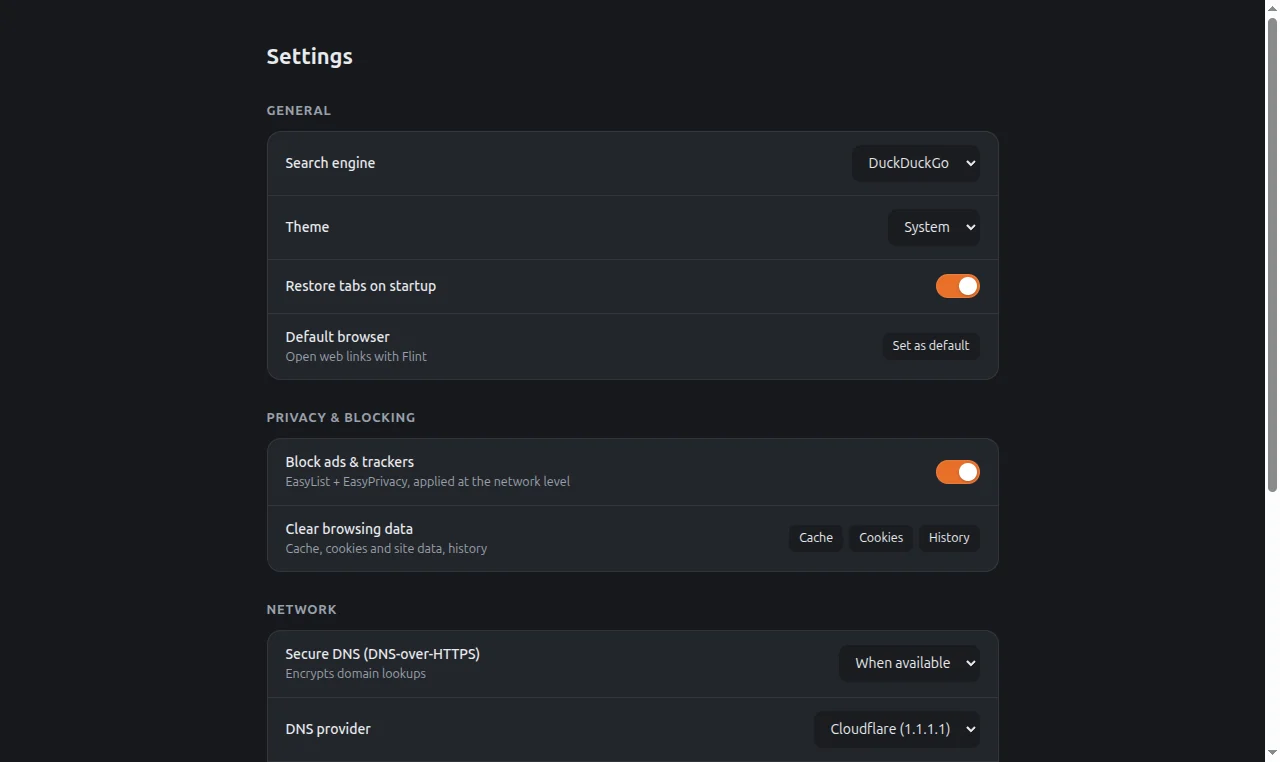
Change the secure DNS mode
Open the menu and select Settings.
Under Network, open the Secure DNS (DNS-over-HTTPS) list and pick a mode.
| Mode | What it does |
|---|---|
| Off | Uses your system's normal DNS. |
| When available | Uses the secure provider, and falls back to your system's DNS if the provider cannot be reached. This is the default. |
| Always (strict) | Uses only the secure provider. If it cannot be reached, pages do not load. |
Pick a provider
Under Network, open DNS provider and pick one:
| Provider | Address used |
|---|---|
| Cloudflare (1.1.1.1) | https://cloudflare-dns.com/dns-query (default) |
| Quad9 (9.9.9.9) | https://dns.quad9.net/dns-query |
| Google (8.8.8.8) | https://dns.google/dns-query |
| AdGuard DNS | https://dns.adguard-dns.com/dns-query |
| Custom… | An address you type |
The provider you choose sees the names of the sites you visit, and its own privacy policy applies to those lookups.
Use your own resolver
In DNS provider, choose Custom….
A Custom DoH URL box appears.
Type the full DNS-over-HTTPS address of your resolver, for example
https://example.com/dns-query.
If the box is left empty, Flint uses automatic secure DNS without a fixed provider.
HTTPS-only mode
When you type an address without https://, Flint tries the secure version first. If the site does not answer over HTTPS, Flint loads the http:// version instead. Links on pages that point to http:// addresses open as they are.
HTTPS-only mode removes the fallback: if a site you type has no secure version, Flint shows an error instead of loading it insecurely.
Open the menu and select Settings.
Under Network, turn on HTTPS-only mode.
Good to know
With Secure DNS set to Off and no page open, Flint makes no network connections at all.